Chen Yu Pan


From Feature to Standalone Product
I designed AutoTrader’s transition from a crypto exchange feature into a standalone product across web and Android.
Role
Sole Product Designer
Platform
Web · Android app
Scope
Product flows · Web and app integration · Web3 wallet integration
See It Live
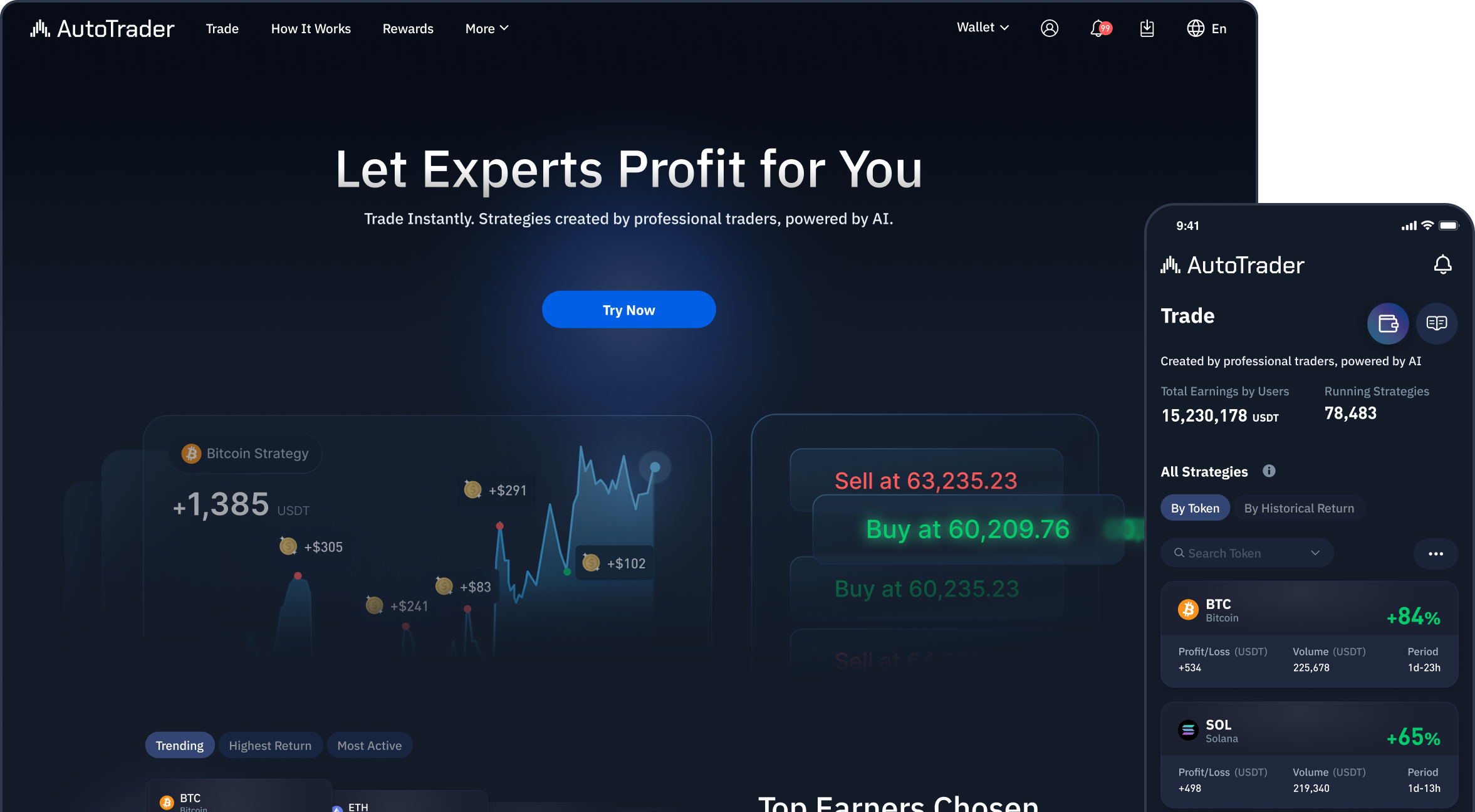
The Missing Product Journey
AutoTrader helped users compare and run automated crypto trading strategies. As a feature within an exchange, it relied on the surrounding platform for account setup and funding. Becoming a standalone product meant bringing those steps into the AutoTrader experience, alongside product information and mobile access.
Existing trading experience


What the standalone product needed


The key decision was what to reuse and what the standalone product needed to provide.
Building the Web Foundation
I kept the existing Trade and Portfolio features and designed the pages and flows needed to use AutoTrader independently: product information, a tutorial, account setup and funding.
Complete the journey
Add the pages and flows users need to understand the product, create an account and fund their trading.
Explain the process clearly
Introduce the basic steps first, with strategy settings and risk controls available when needed.
Keep the existing trading features
Retain Trade and Portfolio with limited changes, and focus new design work on the steps around them.
Existing Feature
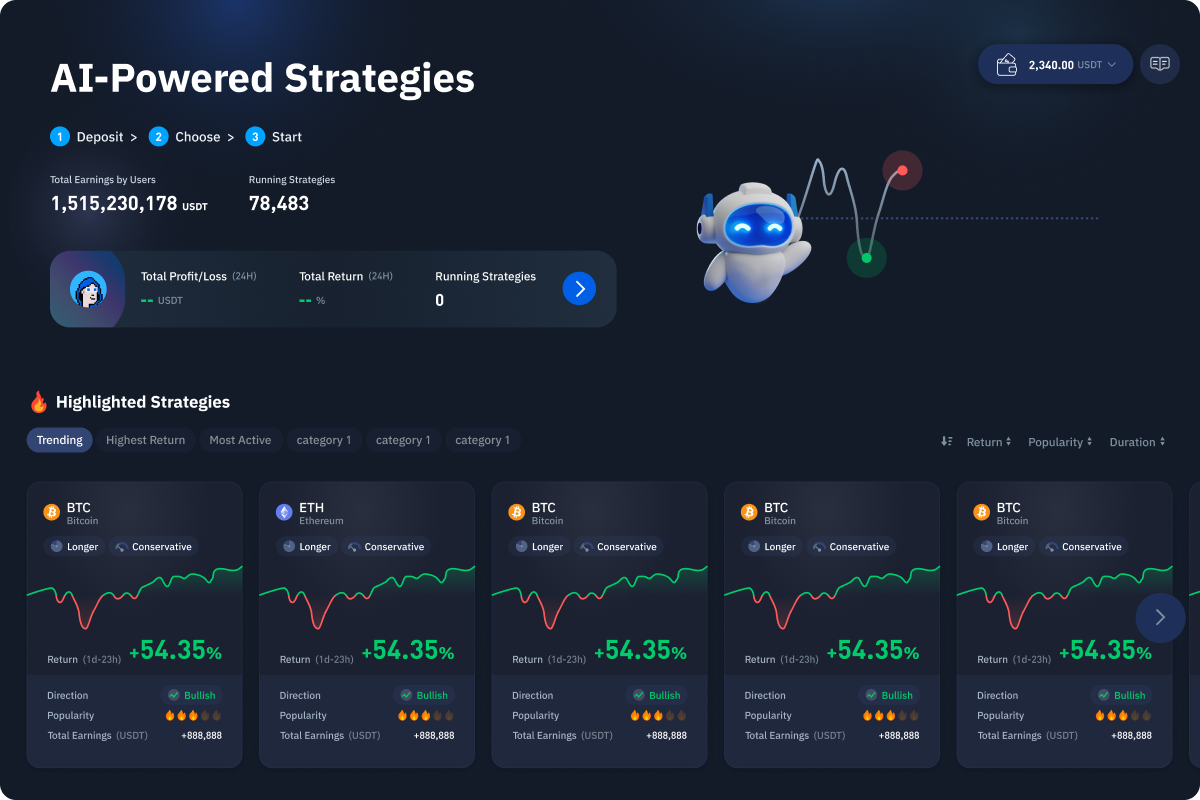
Trade
Browse and start trading strategies
Existing Feature
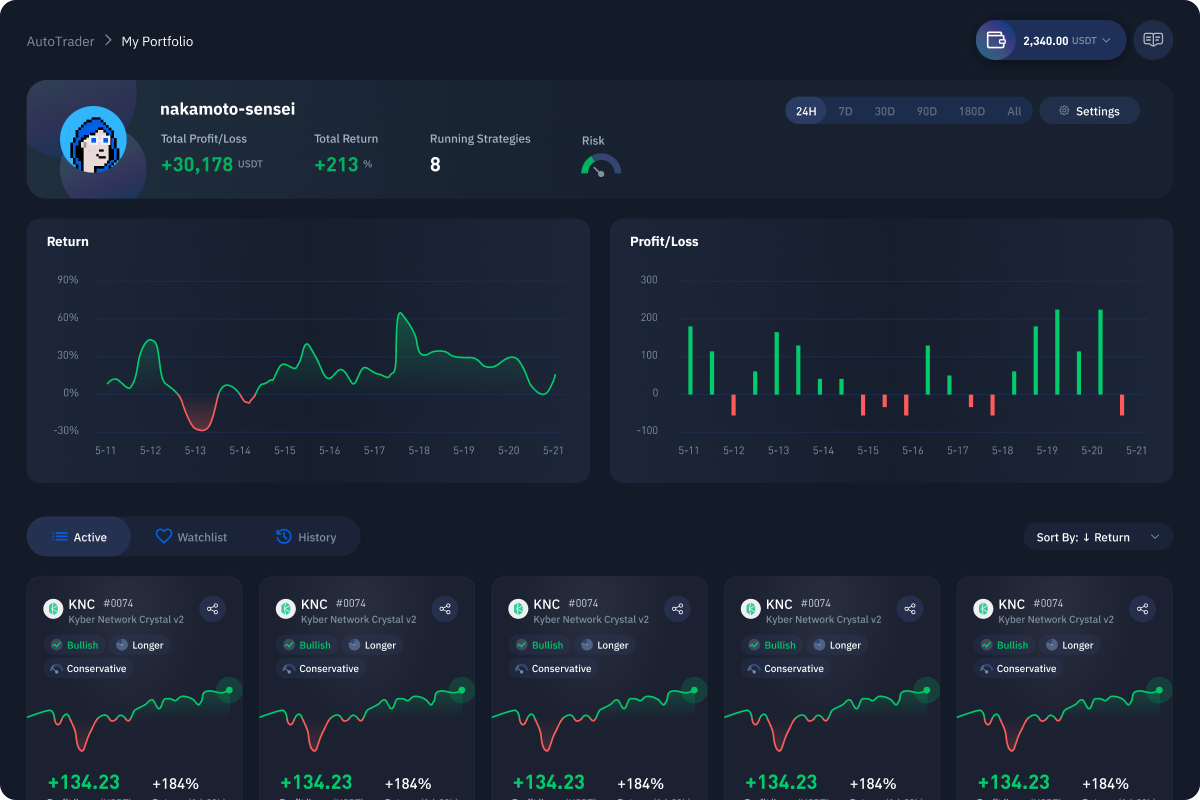
Portfolio
Track performance and active trades
New Web Scope
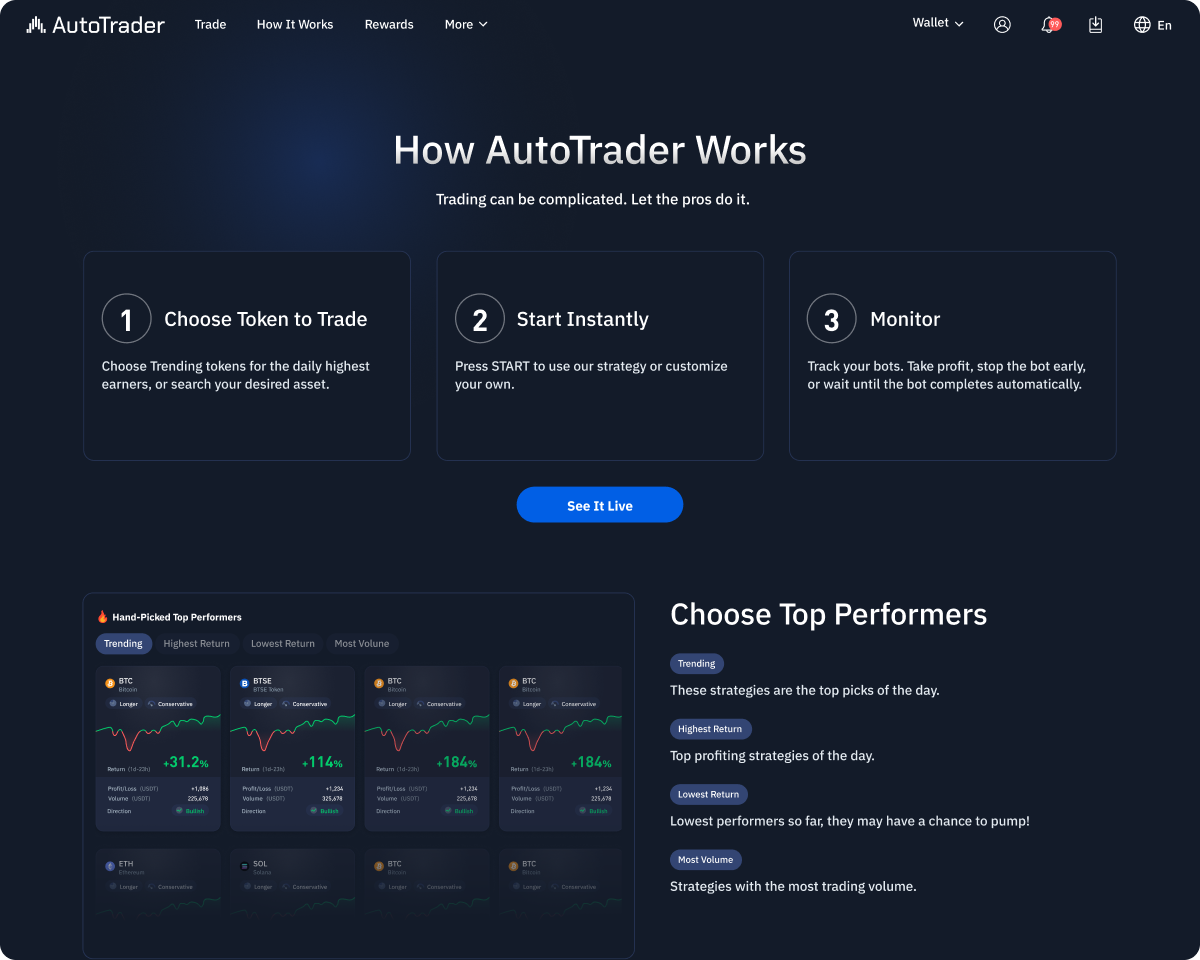
Tutorial
Explain how to choose, start and monitor a strategy.
New Web Scope
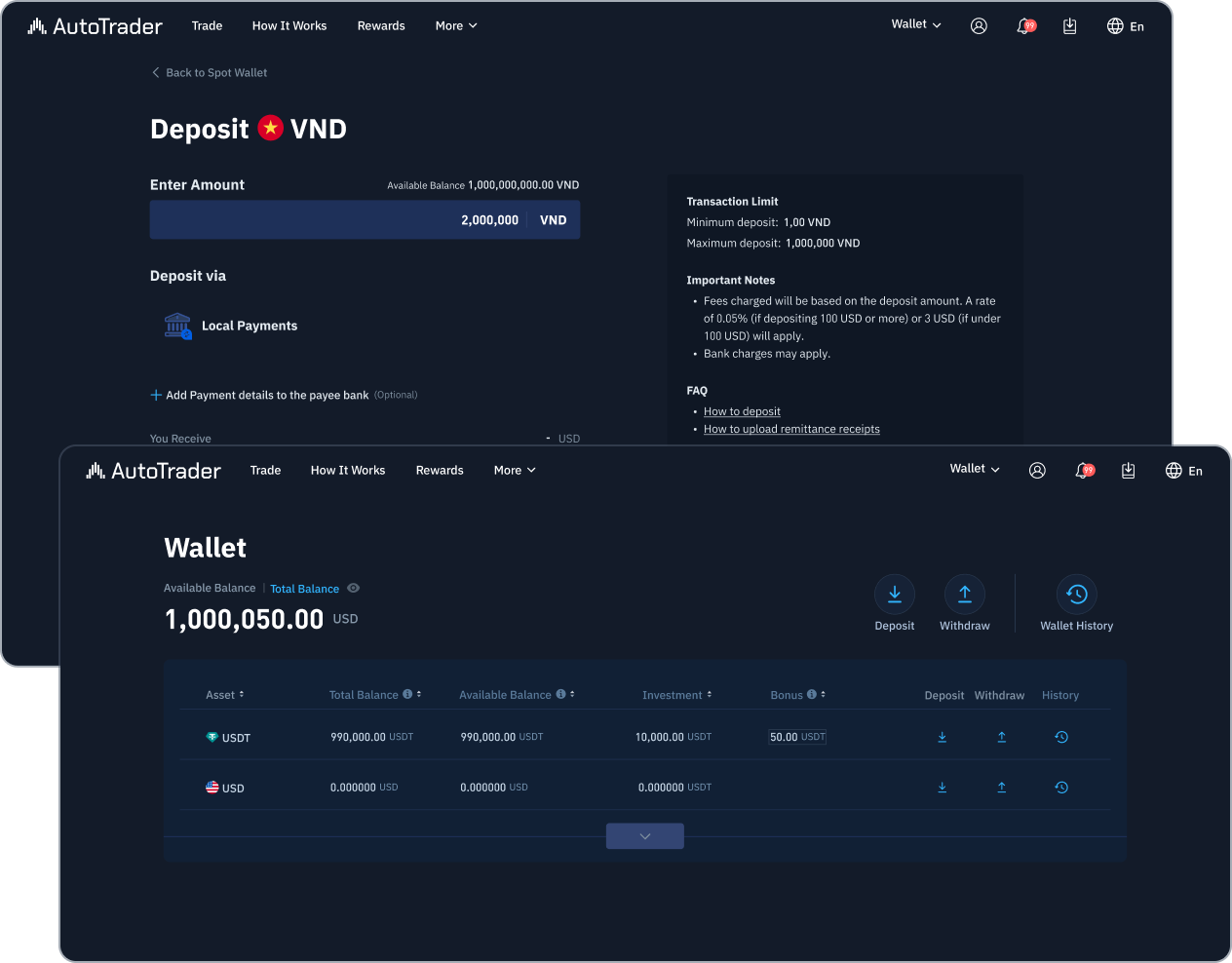
Wallet & Funding
Show balances and connect users to deposit and withdrawal flows.
New Web Scope
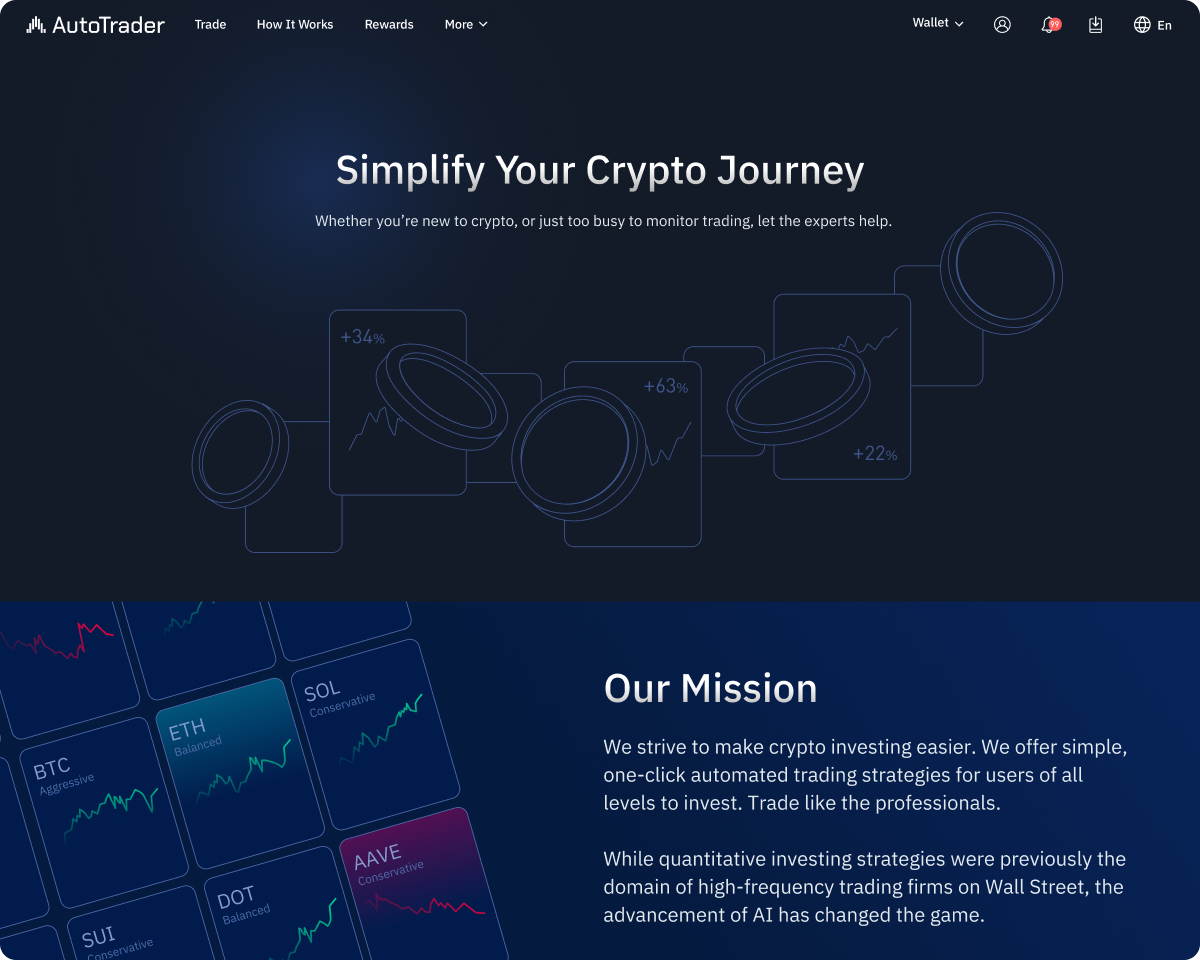
Landing & About
Explain what AutoTrader offers and how to get started.

The Standalone Web Journey
The web design brought product information, account setup, guidance and funding together with the existing trading features.


Meeting the One Month App Timeline
The native Trade and Portfolio features would not be ready within the one month timeline. We used WebView for the existing web screens and reused the existing app template for Wallet and Account. I focused on navigation and connecting the flows.
Reused web screens
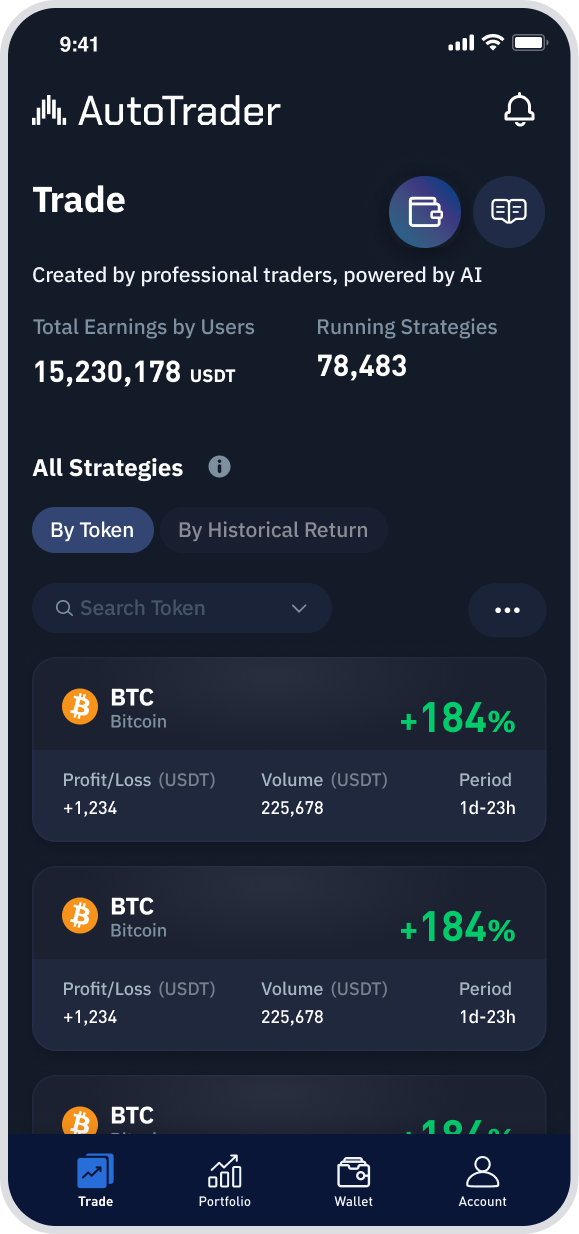
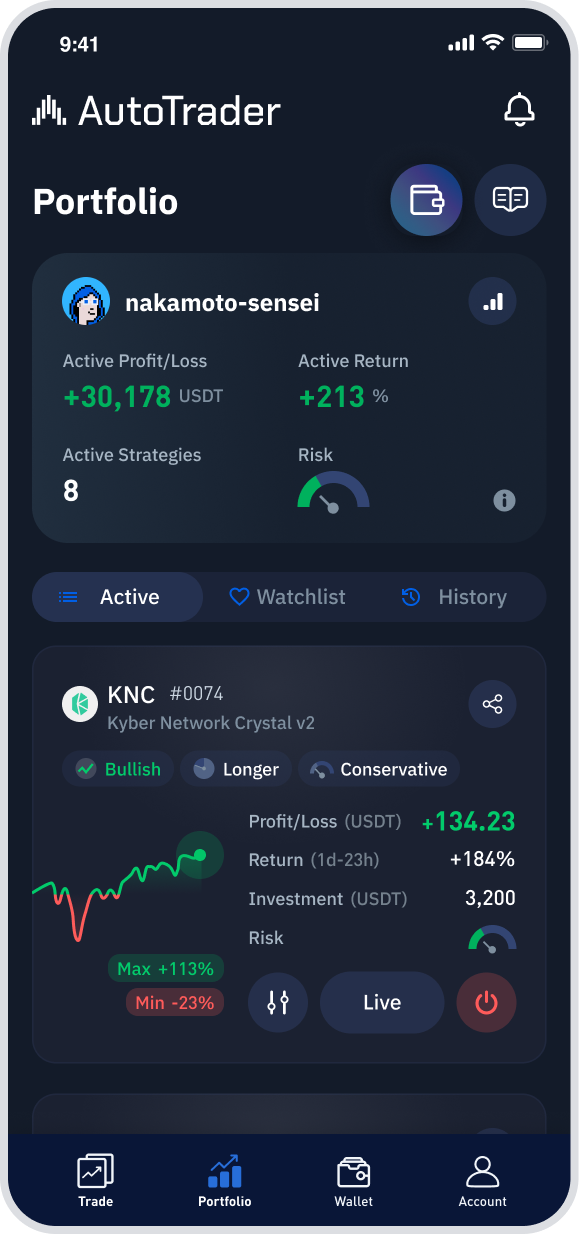
Trade & Portfolio
Keep the existing trading features and adapt their layout and navigation for the app.
Existing App Template
Wallet & Account
Use existing app patterns for deposits, withdrawals, security and account settings.
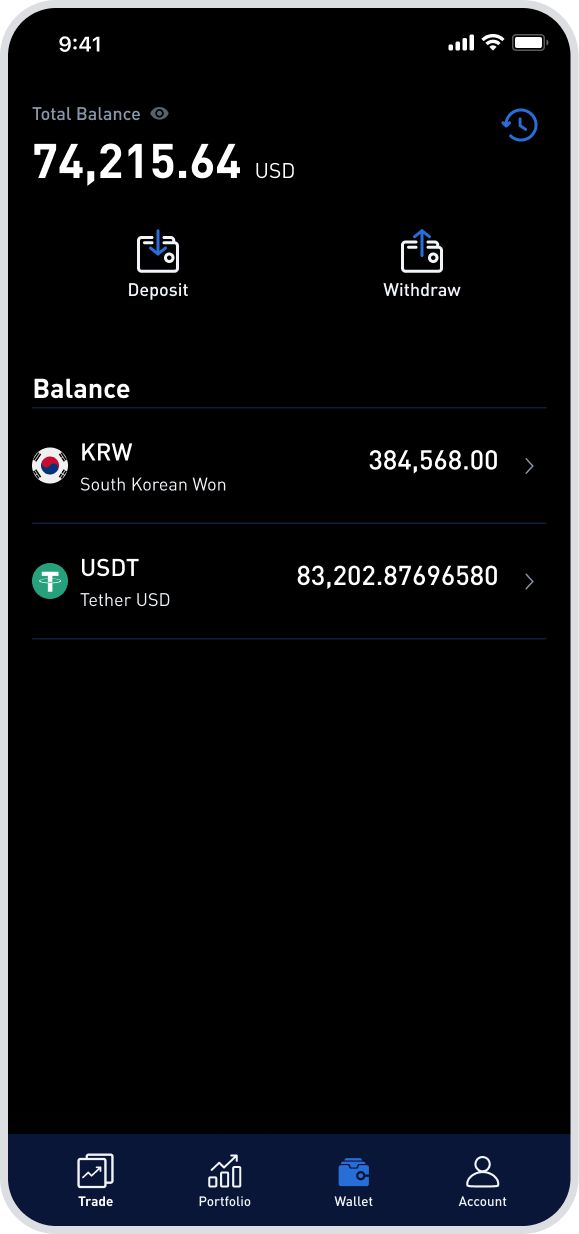
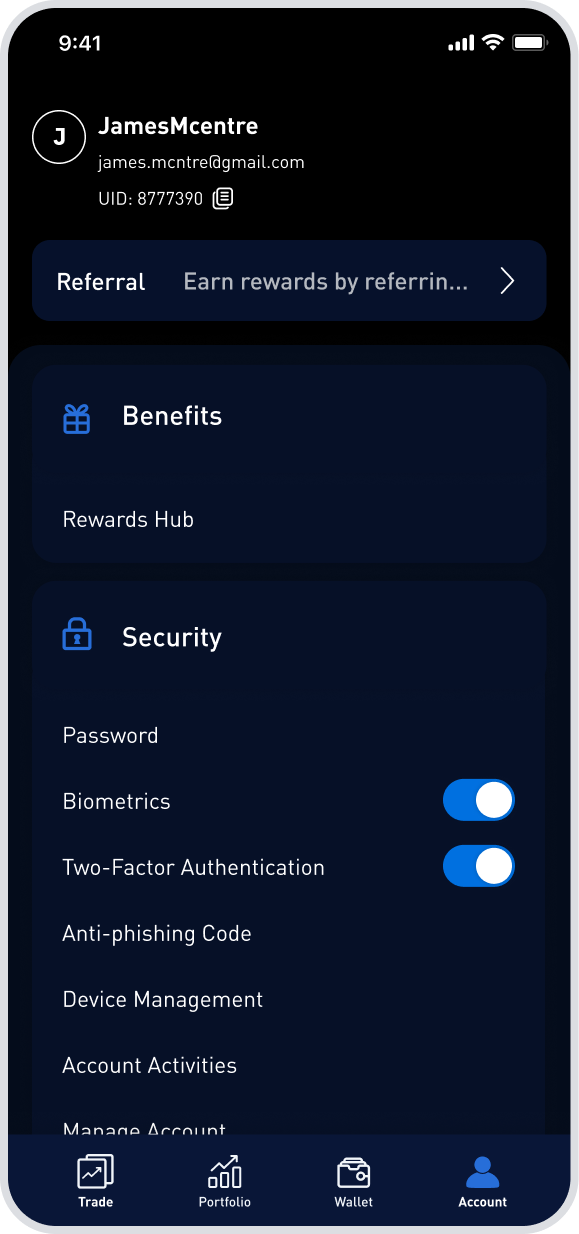
The design work focused on where users moved between web and native screens, and how they continued their task after each transition.
Connecting Trading and Funding
The app sometimes moved users from WebView Trade into native money flows. The design work was keeping the task clear as the surrounding system changed.
Buy Crypto: WebView → Native
Move from Trade into the native Buy Crypto flow, then return to the app with the order status.
On chain Deposit: WebView → Native
Move from Trade into the native deposit flow, ending with the deposit address and QR code.
The main effort was connecting existing WebView trading with native Wallet and Account flows so users could continue the same task across the platform boundary.
Extending the Product with Web3 Access
In a later phase, Web3 wallet support introduced more than another sign up option. Wallet ownership could become part of the user’s account identity and flow directly into first funding, changing how onboarding and funding connected across the product.
Sign up with a Web3 wallet
Connect a supported wallet and confirm ownership to create an account.
Keep funding in onboarding
Offer the first deposit immediately after sign up, while the reason to fund is still clear. User can deposit from connected wallet or via address.
Consistency
Keep the deposit flow consistent whether users start during sign up, from Trade or from the funding page.
Outcome: A Connected Product
The project expanded AutoTrader across three areas: a standalone web experience, an Android app and Web3 wallet sign up and deposits.
Standalone Product
A completed journey
Users could understand the product, prepare funds, trade, track activity and recover from issues.
Web3 Expansion
A shared product model
Wallet identity and transaction states provided a foundation for later Web3 onboarding and funding.
Android App
A focused hybrid scope
Reuse made an approximately one month launch possible while native patterns supported money and account tasks.
Turning a feature into a standalone product did not require rebuilding everything. The key was deciding what to preserve, what to add, and where cross platform integration needed deliberate design.
More case studies?

Let’s work together.


From Feature to Standalone Product
I designed AutoTrader’s transition from a crypto exchange feature into a standalone product across web and Android.
Role
Sole Product Designer
Platform
Web · Android app
Scope
Product flows · Web and app integration · Web3 wallet integration
See It Live
The Missing Product Journey
AutoTrader helped users compare and run automated crypto trading strategies. As a feature within an exchange, it relied on the surrounding platform for account setup and funding. Becoming a standalone product meant bringing those steps into the AutoTrader experience, alongside product information and mobile access.
Existing trading experience


What the standalone product needed


The key decision was what to reuse and what the standalone product needed to provide.
Building the Web Foundation
I kept the existing Trade and Portfolio features and designed the pages and flows needed to use AutoTrader independently: product information, a tutorial, account setup and funding.
Complete the journey
Add the pages and flows users need to understand the product, create an account and fund their trading.
Explain the process clearly
Introduce the basic steps first, with strategy settings and risk controls available when needed.
Keep the existing trading features
Retain Trade and Portfolio with limited changes, and focus new design work on the steps around them.
Existing Feature
Trade
Browse and start trading strategies
Existing Feature
Portfolio
Track performance and active trades
New Web Scope
Tutorial
Explain how to choose, start and monitor a strategy.
New Web Scope
Wallet & Funding
Show balances and connect users to deposit and withdrawal flows.
New Web Scope
Landing & About
Explain what AutoTrader offers and how to get started.
The Standalone Web Journey
The web design brought product information, account setup, guidance and funding together with the existing trading features.


Meeting the One Month App Timeline
The native Trade and Portfolio features would not be ready within the one month timeline. We used WebView for the existing web screens and reused the existing app template for Wallet and Account. I focused on navigation and connecting the flows.
Reused web screens
Trade & Portfolio
Keep the existing trading features and adapt their layout and navigation for the app.
Existing App Template
Wallet & Account
Use existing app patterns for deposits, withdrawals, security and account settings.
The design work focused on where users moved between web and native screens, and how they continued their task after each transition.
Connecting Trading and Funding
The app sometimes moved users from WebView Trade into native money flows. The design work was keeping the task clear as the surrounding system changed.
Buy Crypto: WebView → Native
Move from Trade into the native Buy Crypto flow, then return to the app with the order status.
On chain Deposit: WebView → Native
Move from Trade into the native deposit flow, ending with the deposit address and QR code.
The main effort was connecting existing WebView trading with native Wallet and Account flows so users could continue the same task across the platform boundary.
Extending the Product with Web3 Access
In a later phase, Web3 wallet support introduced more than another sign up option. Wallet ownership could become part of the user’s account identity and flow directly into first funding, changing how onboarding and funding connected across the product.
Sign up with a Web3 wallet
Connect a supported wallet and confirm ownership to create an account.
Keep funding in onboarding
Offer the first deposit immediately after sign up, while the reason to fund is still clear. User can deposit from connected wallet or via address.
Consistency
Keep the deposit flow consistent whether users start during sign up, from Trade or from the funding page.
Outcome: A Connected Product
The project expanded AutoTrader across three areas: a standalone web experience, an Android app and Web3 wallet sign up and deposits.
Standalone Product
A completed journey
Users could understand the product, prepare funds, trade, track activity and recover from issues.
Web3 Expansion
A shared product model
Wallet identity and transaction states provided a foundation for later Web3 onboarding and funding.
Android App
A focused hybrid scope
Reuse made an approximately one month launch possible while native patterns supported money and account tasks.
Turning a feature into a standalone product did not require rebuilding everything. The key was deciding what to preserve, what to add, and where cross platform integration needed deliberate design.
More case studies?
Let’s work together.
From Feature to Standalone Product
I designed AutoTrader’s transition from a crypto exchange feature into a standalone product across web and Android.
Role
Sole Product Designer
Platform
Web · Android app
Scope
Product flows · Web and app integration · Web3 wallet integration
See It Live
The Missing Product Journey
AutoTrader helped users compare and run automated crypto trading strategies. As a feature within an exchange, it relied on the surrounding platform for account setup and funding. Becoming a standalone product meant bringing those steps into the AutoTrader experience, alongside product information and mobile access.
Existing trading experience


What the standalone product needed


The key decision was what to reuse and what the standalone product needed to provide.
Building the Web Foundation
I kept the existing Trade and Portfolio features and designed the pages and flows needed to use AutoTrader independently: product information, a tutorial, account setup and funding.
Complete the journey
Add the pages and flows users need to understand the product, create an account and fund their trading.
Explain the process clearly
Introduce the basic steps first, with strategy settings and risk controls available when needed.
Keep the existing trading features
Retain Trade and Portfolio with limited changes, and focus new design work on the steps around them.
Existing Feature
Trade
Browse and start trading strategies
Existing Feature
Portfolio
Track performance and active trades
New Web Scope
Tutorial
Explain how to choose, start and monitor a strategy.
New Web Scope
Wallet & Funding
Show balances and connect users to deposit and withdrawal flows.
New Web Scope
Landing & About
Explain what AutoTrader offers and how to get started.
The Standalone Web Journey
The web design brought product information, account setup, guidance and funding together with the existing trading features.


Meeting the One Month App Timeline
The native Trade and Portfolio features would not be ready within the one month timeline. We used WebView for the existing web screens and reused the existing app template for Wallet and Account. I focused on navigation and connecting the flows.
Reused web screens
Trade & Portfolio
Keep the existing trading features and adapt their layout and navigation for the app.
Existing App Template
Wallet & Account
Use existing app patterns for deposits, withdrawals, security and account settings.
The design work focused on where users moved between web and native screens, and how they continued their task after each transition.
Connecting Trading and Funding
The app sometimes moved users from WebView Trade into native money flows. The design work was keeping the task clear as the surrounding system changed.
Buy Crypto: WebView → Native
Move from Trade into the native Buy Crypto flow, then return to the app with the order status.
On chain Deposit: WebView → Native
Move from Trade into the native deposit flow, ending with the deposit address and QR code.
The main effort was connecting existing WebView trading with native Wallet and Account flows so users could continue the same task across the platform boundary.
Extending the Product with Web3 Access
In a later phase, Web3 wallet support introduced more than another sign up option. Wallet ownership could become part of the user’s account identity and flow directly into first funding, changing how onboarding and funding connected across the product.
Sign up with a Web3 wallet
Connect a supported wallet and confirm ownership to create an account.
Keep funding in onboarding
Offer the first deposit immediately after sign up, while the reason to fund is still clear. User can deposit from connected wallet or via address.
Consistency
Keep the deposit flow consistent whether users start during sign up, from Trade or from the funding page.
Outcome: A Connected Product
The project expanded AutoTrader across three areas: a standalone web experience, an Android app and Web3 wallet sign up and deposits.
Standalone Product
A completed journey
Users could understand the product, prepare funds, trade, track activity and recover from issues.
Web3 Expansion
A shared product model
Wallet identity and transaction states provided a foundation for later Web3 onboarding and funding.
Android App
A focused hybrid scope
Reuse made an approximately one month launch possible while native patterns supported money and account tasks.
Turning a feature into a standalone product did not require rebuilding everything. The key was deciding what to preserve, what to add, and where cross platform integration needed deliberate design.
More case studies?
Let’s work together.
From Feature to Standalone Product
I designed AutoTrader’s transition from a crypto exchange feature into a standalone product across web and Android.
Role
Sole Product Designer
Platform
Web · Android app
Scope
Product flows · Web and app integration · Web3 wallet integration
See It Live
The Missing Product Journey
AutoTrader helped users compare and run automated crypto trading strategies. As a feature within an exchange, it relied on the surrounding platform for account setup and funding. Becoming a standalone product meant bringing those steps into the AutoTrader experience, alongside product information and mobile access.
Existing trading experience


What the standalone product needed


The key decision was what to reuse and what the standalone product needed to provide.
Building the Web Foundation
I kept the existing Trade and Portfolio features and designed the pages and flows needed to use AutoTrader independently: product information, a tutorial, account setup and funding.
Complete the journey
Add the pages and flows users need to understand the product, create an account and fund their trading.
Explain the process clearly
Introduce the basic steps first, with strategy settings and risk controls available when needed.
Keep the existing trading features
Retain Trade and Portfolio with limited changes, and focus new design work on the steps around them.
Existing Feature
Trade
Browse and start trading strategies
Existing Feature
Portfolio
Track performance and active trades
New Web Scope
Tutorial
Explain how to choose, start and monitor a strategy.
New Web Scope
Wallet & Funding
Show balances and connect users to deposit and withdrawal flows.
New Web Scope
Landing & About
Explain what AutoTrader offers and how to get started.
The Standalone Web Journey
The web design brought product information, account setup, guidance and funding together with the existing trading features.




Meeting the One Month App Timeline
The native Trade and Portfolio features would not be ready within the one month timeline. We used WebView for the existing web screens and reused the existing app template for Wallet and Account. I focused on navigation and connecting the flows.
Reused web screens
Trade & Portfolio
Keep the existing trading features and adapt their layout and navigation for the app.
Existing App Template
Wallet & Account
Use existing app patterns for deposits, withdrawals, security and account settings.
The design work focused on where users moved between web and native screens, and how they continued their task after each transition.
Connecting Trading and Funding
The app sometimes moved users from WebView Trade into native money flows. The design work was keeping the task clear as the surrounding system changed.
Buy Crypto: WebView → Native
Move from Trade into the native Buy Crypto flow, then return to the app with the order status.
On chain Deposit: WebView → Native
Move from Trade into the native deposit flow, ending with the deposit address and QR code.
The main effort was connecting existing WebView trading with native Wallet and Account flows so users could continue the same task across the platform boundary.
Extending the Product with Web3 Access
In a later phase, Web3 wallet support introduced more than another sign up option. Wallet ownership could become part of the user’s account identity and flow directly into first funding, changing how onboarding and funding connected across the product.
Sign up with a Web3 wallet
Connect a supported wallet and confirm ownership to create an account.
Keep funding in onboarding
Offer the first deposit immediately after sign up, while the reason to fund is still clear. User can deposit from connected wallet or via address.
Consistency
Keep the deposit flow consistent whether users start during sign up, from Trade or from the funding page.
Outcome: A Connected Product
The project expanded AutoTrader across three areas: a standalone web experience, an Android app and Web3 wallet sign up and deposits.
Standalone Product
A completed journey
Users could understand the product, prepare funds, trade, track activity and recover from issues.
Web3 Expansion
A shared product model
Wallet identity and transaction states provided a foundation for later Web3 onboarding and funding.
Android App
A focused hybrid scope
Reuse made an approximately one month launch possible while native patterns supported money and account tasks.
Turning a feature into a standalone product did not require rebuilding everything. The key was deciding what to preserve, what to add, and where cross platform integration needed deliberate design.
More case studies?
Let’s work together.
From Feature to Standalone Product
I designed AutoTrader’s transition from a crypto exchange feature into a standalone product across web and Android.
Role
Sole Product Designer
Platform
Web · Android app
Scope
Product flows · Web and app integration · Web3 wallet integration
See It Live
The Missing Product Journey
AutoTrader helped users compare and run automated crypto trading strategies. As a feature within an exchange, it relied on the surrounding platform for account setup and funding. Becoming a standalone product meant bringing those steps into the AutoTrader experience, alongside product information and mobile access.
Existing trading experience
What the standalone product needed
The key decision was what to reuse and what the standalone product needed to provide.
Building the Web Foundation
I kept the existing Trade and Portfolio features and designed the pages and flows needed to use AutoTrader independently: product information, a tutorial, account setup and funding.
Complete the journey
Add the pages and flows users need to understand the product, create an account and fund their trading.
Explain the process clearly
Introduce the basic steps first, with strategy settings and risk controls available when needed.
Keep the existing trading features
Retain Trade and Portfolio with limited changes, and focus new design work on the steps around them.
Existing Feature
Trade
Browse and start trading strategies
Existing Feature
Portfolio
Track performance and active trades
New Web Scope
Tutorial
Explain how to choose, start and monitor a strategy.
New Web Scope
Wallet & Funding
Show balances and connect users to deposit and withdrawal flows.
New Web Scope
Landing & About
Explain what AutoTrader offers and how to get started.
The Standalone Web Journey
The web design brought product information, account setup, guidance and funding together with the existing trading features.




Meeting the One Month App Timeline
The native Trade and Portfolio features would not be ready within the one month timeline. We used WebView for the existing web screens and reused the existing app template for Wallet and Account. I focused on navigation and connecting the flows.
Reused web screens
Trade & Portfolio
Keep the existing trading features and adapt their layout and navigation for the app.
Existing App Template
Wallet & Account
Use existing app patterns for deposits, withdrawals, security and account settings.
The design work focused on where users moved between web and native screens, and how they continued their task after each transition.
Connecting Trading and Funding
The app sometimes moved users from WebView Trade into native money flows. The design work was keeping the task clear as the surrounding system changed.
Buy Crypto: WebView → Native
Move from Trade into the native Buy Crypto flow, then return to the app with the order status.
On chain Deposit: WebView → Native
Move from Trade into the native deposit flow, ending with the deposit address and QR code.
The main effort was connecting existing WebView trading with native Wallet and Account flows so users could continue the same task across the platform boundary.
Extending the Product with Web3 Access
In a later phase, Web3 wallet support introduced more than another sign up option. Wallet ownership could become part of the user’s account identity and flow directly into first funding, changing how onboarding and funding connected across the product.
Sign up with a Web3 wallet
Connect a supported wallet and confirm ownership to create an account.
Keep funding in onboarding
Offer the first deposit immediately after sign up, while the reason to fund is still clear. User can deposit from connected wallet or via address.
Consistency
Keep the deposit flow consistent whether users start during sign up, from Trade or from the funding page.
Outcome: A Connected Product
The project expanded AutoTrader across three areas: a standalone web experience, an Android app and Web3 wallet sign up and deposits.
Standalone Product
A completed journey
Users could understand the product, prepare funds, trade, track activity and recover from issues.
Web3 Expansion
A shared product model
Wallet identity and transaction states provided a foundation for later Web3 onboarding and funding.
Android App
A focused hybrid scope
Reuse made an approximately one month launch possible while native patterns supported money and account tasks.
Turning a feature into a standalone product did not require rebuilding everything. The key was deciding what to preserve, what to add, and where cross platform integration needed deliberate design.
More case studies?
Let’s work together.